



What we want
This project follows the article Getting a Chinese game controller to obey an ESP32, which set up a reliable wireless link between the board and its controller. The eyes build on it. Here is what we expect of them:
- two living eyes: the gaze moves on its own, the eyelids blink, the pupil breathes a little;
- expressions: neutral, happy, sad, angry, surprised, sleepy, suspicious, a wink, tears, and rain on the glass with its windscreen wiper;
- the controller in charge: the bumpers to move from one expression to the next, the sticks to steer the gaze, the triggers to close the eyelids;
- the robot’s wiring, not test-bench wiring: both eyes and the information screen share the same bus;
- figures for the final robot: what the eyes cost in processor time, memory and bus time, measured separately from what the Bluetooth link costs.
The last point matters more than the others. The robot will also have to drive four motors, read its sensors and watch its battery, with the same chip. Gorgeous eyes that steal computing time from the motors would be a bad deal.
The hardware
The board is the same as for the controller: an ESP32-S31 Function-CoreBoard-1 from Espressif, the development board carrying the robot’s microcontroller. A development board is a small board sold by a microcontroller manufacturer: it carries the chip, its power supply, its USB ports and a connector exposing its pins, so you can write and test a program before the final circuit board exists. Its microcontroller, the ESP32-S31, has two RISC-V cores at 320 MHz: two complete processors in the same chip, able to work at the same time. It also has 512 KB of internal RAM and, on this board, 16 MB of PSRAM (external RAM, slower but much larger). Both details will come in handy.
Three screens are connected to it:
| Screen | Chip | Size | Role |
|---|---|---|---|
| Information screen | ST7789 | 1.9 inch, 170 × 320 pixels | link status, expression, measurements, instructions |
| Left eye | ST7735S | 1.44 inch, 128 × 128 pixels | the eye |
| Right eye | ST7735S | 1.44 inch, 128 × 128 pixels | the eye |
All three speak SPI, a clocked serial link: the board sends its commands and pixels over a data wire, in step with a clock wire. The robot’s eyes will be the same size, 128 × 128 pixels, with the same chip.
The decisions made before writing a line
1. The signals are shared, except the selection. On the SPI bus, several screens can share the clock, the data and the pin that tells a command from a pixel (DC). Each keeps its own select pin (CS, chip select): the board pulls low the select line of the screen it is talking to, and only that screen listens. The robot takes the sharing further: reset (RES) and backlight (BLK) are shared too. Three screens therefore fit on eight microcontroller pins instead of eighteen.
| Module pin | Signal | ESP32 pin | Shared by all three screens? |
|---|---|---|---|
| SCL | SPI clock | IO42 | yes |
| SDA | SPI data | IO43 | yes |
| DC | command or pixel | IO46 | yes |
| RES | reset | IO48 | yes |
| BLK | backlight | IO37 | yes |
| CS | left eye select | IO44 | no |
| CS | right eye select | IO45 | no |
| CS | information screen select | IO49 | no |
SCL and SDA are the names module sellers give to the SPI clock and data; despite the names, this is not an I²C bus. Since reset is shared, it happens only once, at start-up, and each screen is then reinitialised by a command that affects it alone. Since the backlight is shared, the three screens light up and dim together.
2. Draw on the computer first. Before touching the microcontroller, we drew the eyes as an animated SVG: a vector image file that also contains a small program, and animates itself in a web browser. The aim was to choose the drawing: the style of the eye, the expressions, the speed of the blinks. Changing a line and reloading the page takes a second; recompiling and uploading a program takes a minute.
3. A realistic eye, with circuit-board traces. The starting style is that of the animated eyes Adafruit made popular: an eyeball, a textured iris, a pupil, eyelids. We added expressions, and replaced the red veins with copper traces that turn at 45° and end on a via. It is a robot; its eyes may as well say so.
4. Compute rather than store, and measure before deciding. The project’s first decision stored the eye images on the microSD card. It assumed images. Once the drawing settled on eyes that move continuously, we chose to try computing them and measure it.
5. Bluetooth on one core, the eyes on the other. Each core does a single job, and its load can be read separately. The first runs the radio, the link with the controller and the information screen; the second does nothing but the eyes.
The mock-up: choosing the look in a browser
Here is the mock-up as we used it to decide on the drawing. It is alive: the eyes look around, blink and change expression every seven seconds. The buttons choose an expression; “Real pixels” shows the eye at the resolution of a 160 × 80 screen.
Everything fits in a single file: the drawing, the small program that animates it, and the buttons. You can download it and open it in any browser; its code can be read with a plain text editor. Several choices were made by watching it run: slower changes of expression, which had looked like jolts; the wink redone as a real gesture (quick close, a moment shut, slower reopening); and the “real pixels” view, which showed that a detail invisible at this size is not worth computing.
From the mock-up to the board: computing every pixel
The browser draws the mock-up with curves, gradients and blurs: it has a complete graphics engine for that. The microcontroller does not. All it can do is fill an array of numbers, one number per pixel, and send it to the screen. Translating therefore means redoing, for every pixel of every eye, the calculation the browser used to do for us: am I in the iris? on one of its fibres? in the pupil? under the shadow of an eyelid? in the eyelid? Each answer colours the pixel a little, on top of the previous one.
Two techniques keep the image clean. Anti-aliasing (smoothing edges, which avoids staircase steps): an edge that crosses a pixel colours it only partly, according to the distance from the pixel’s centre to the edge. Dithering (a regular spreading of rounding errors): the screen has only 32 levels of red and blue, and without it the gradient of the white of the eye would show as bands. And the program draws its traces and the iris fibres with the same random-number generator as the mock-up, with the same seed: the board’s eyes have exactly the drawing of the computer’s.
Three components do the work, kept separate so they can be reused on the robot:
yeux(eyes): the drawing and life of the eyes. It knows nothing about hardware: it fills pixel arrays, and nothing else;ecran_st7735: the driver for the eye screens. ESP-IDF, Espressif’s development framework, provides a driver for the ST7789 of the information screen, but none for the ST7735S; it had to be written;liaison_manette(controller link): the link from the previous article, taken out of the trial 04 program into an ESP-IDF component, that is, a folder of reusable code that several programs include without copying it. The program sees only three functions of it:manette::demarrer()starts the link,manette::situation()says where it stands, andmanette::commandes()returns the buttons, sticks and triggers. Two copies of the same code always end up diverging, the first time one of them is fixed; a component exists only once.
Where we got stuck
First power-up: noise
With the three screens wired, the information screen came on normally. The two eyes showed this.
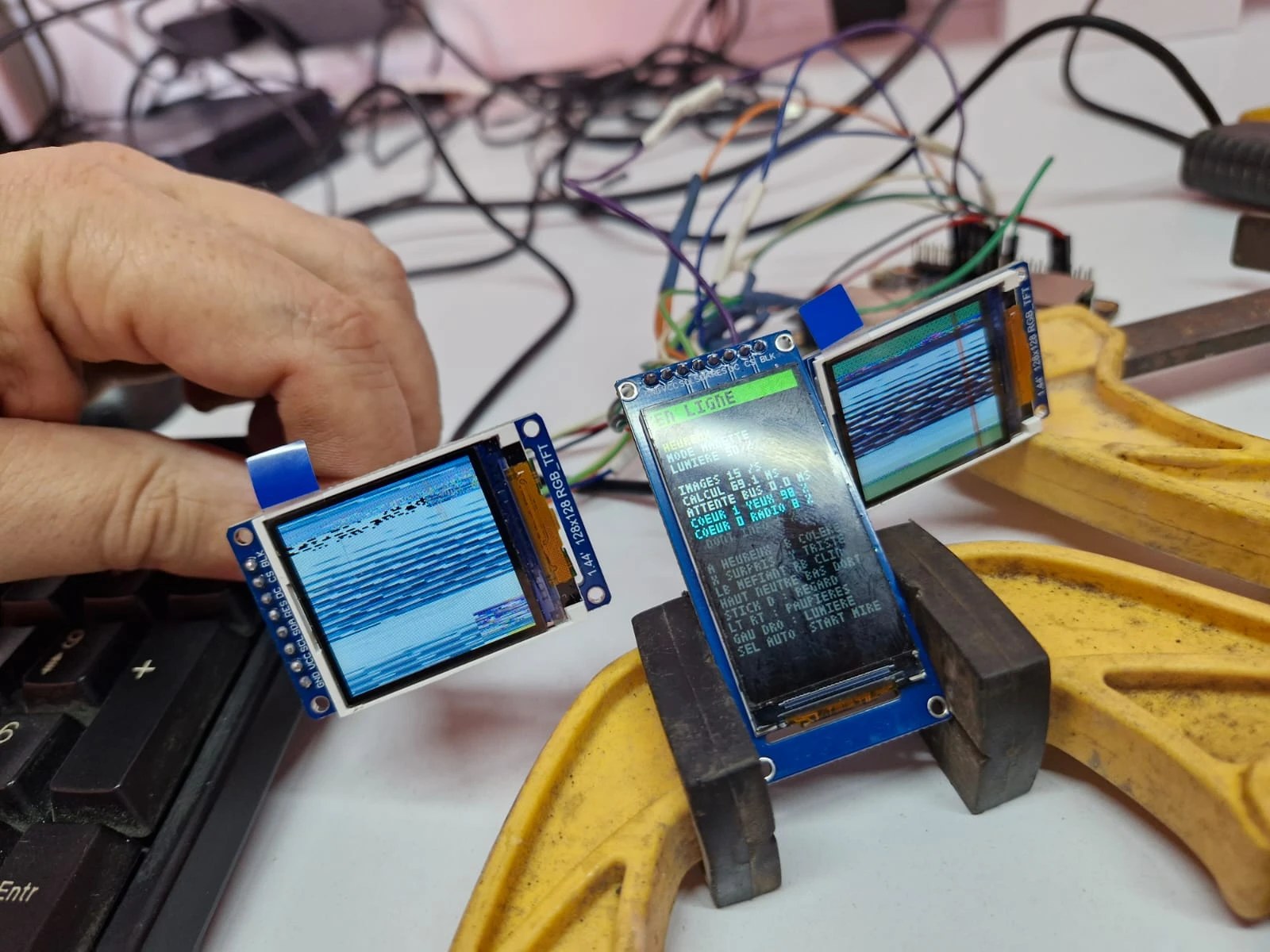
Something moved when the controller was touched: the program was running, and the screens were receiving pixels. The select wires were correct. The answer was written on the modules: the driver had been set up for the 0.96-inch screens first planned for the robot, and the bench modules were 1.44-inch ones. The chip, though, is indeed the same.
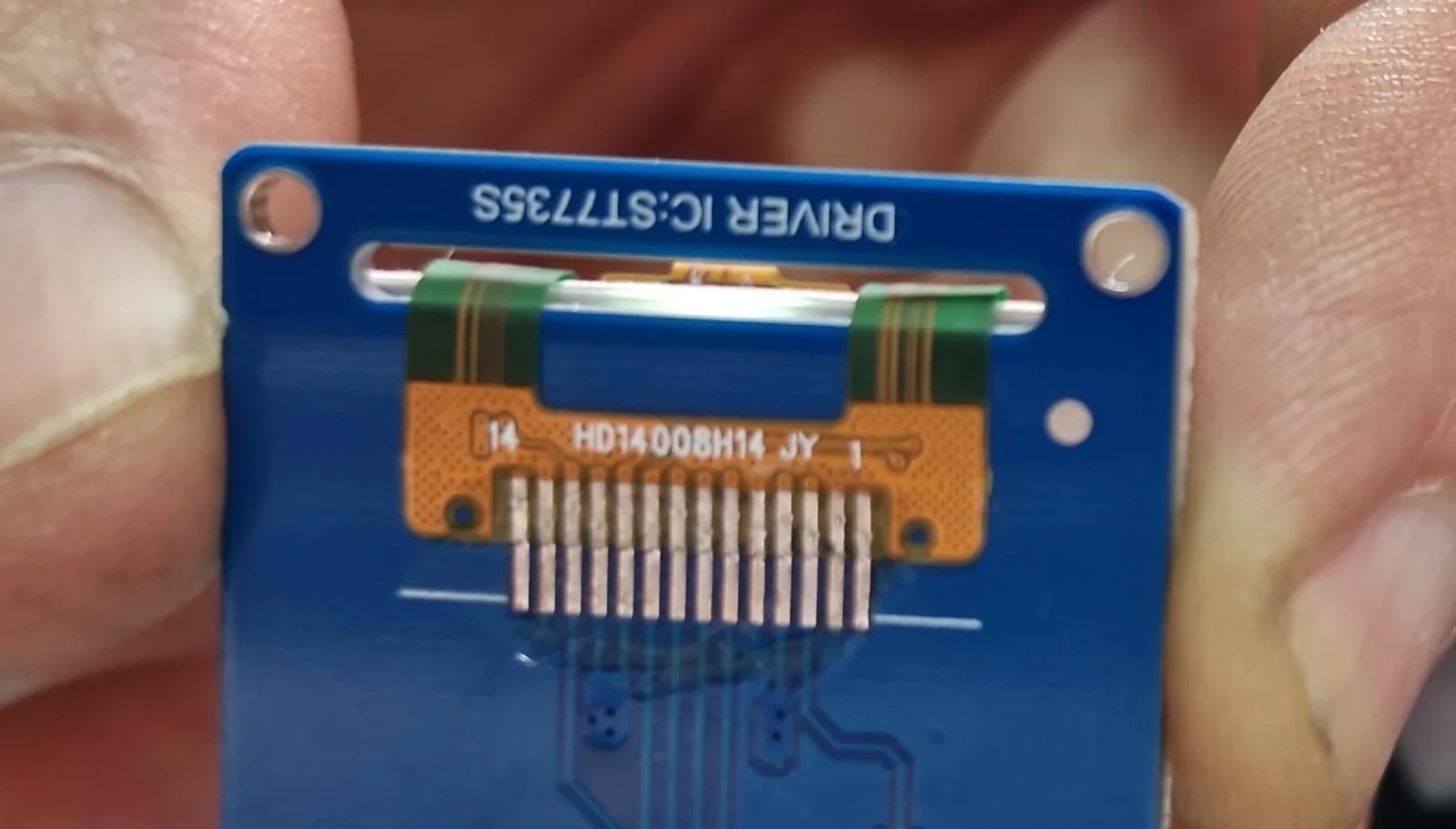
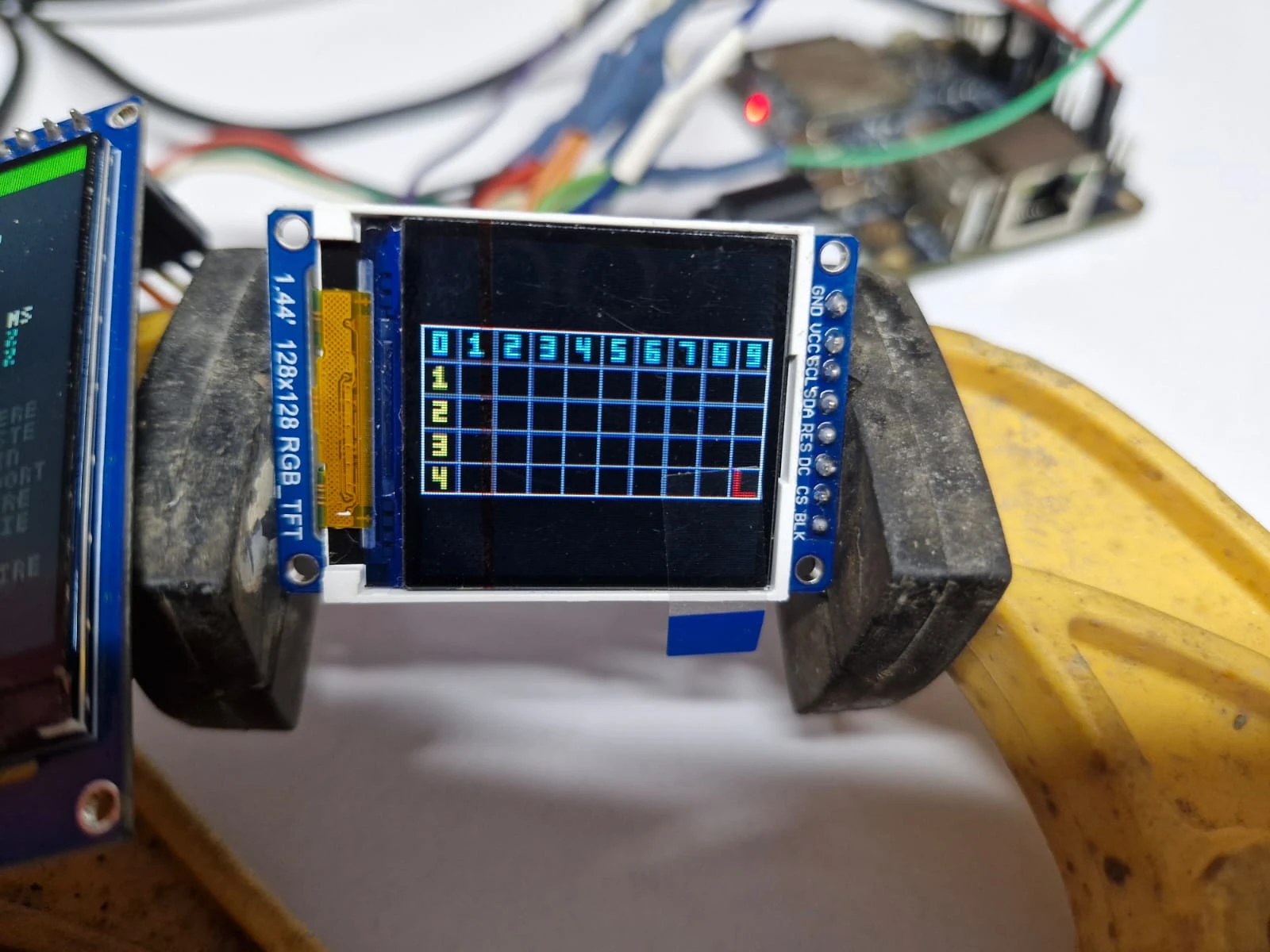
Same chip, different panel: that is the whole problem. The ST7735S has a memory of 132 × 162 pixels, and a panel shows only part of it, at a position that depends on the model. The driver was writing in the wrong place, and requesting the colour inversion that IPS panels need and this one does not. The trick that then made every test readable: at start-up, the driver blacks out all of the chip’s memory, not just the area it believes visible. A wrong setting then shifts or crops the image, but no longer leaves noise to hide it. A numbered grid, displayed until A is pressed, then tells exactly, to the pixel, what the screen shows.
Square, despite appearances
The test image, colour bands in a frame, filled only part of the screen.
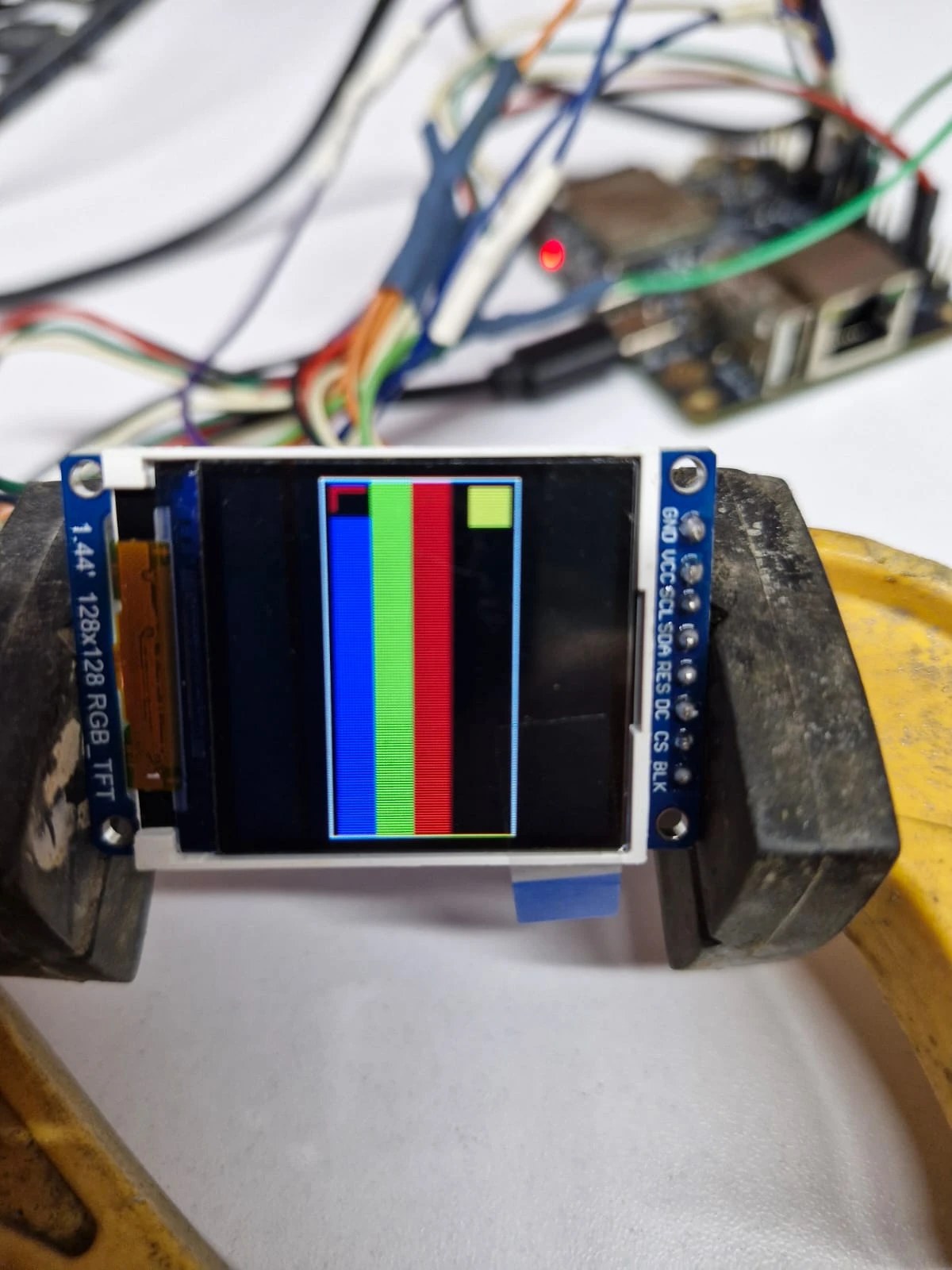
The screen looked rectangular to us. So we tried treating it as 160 × 128, so that the mock-up’s eye would fit on it whole.
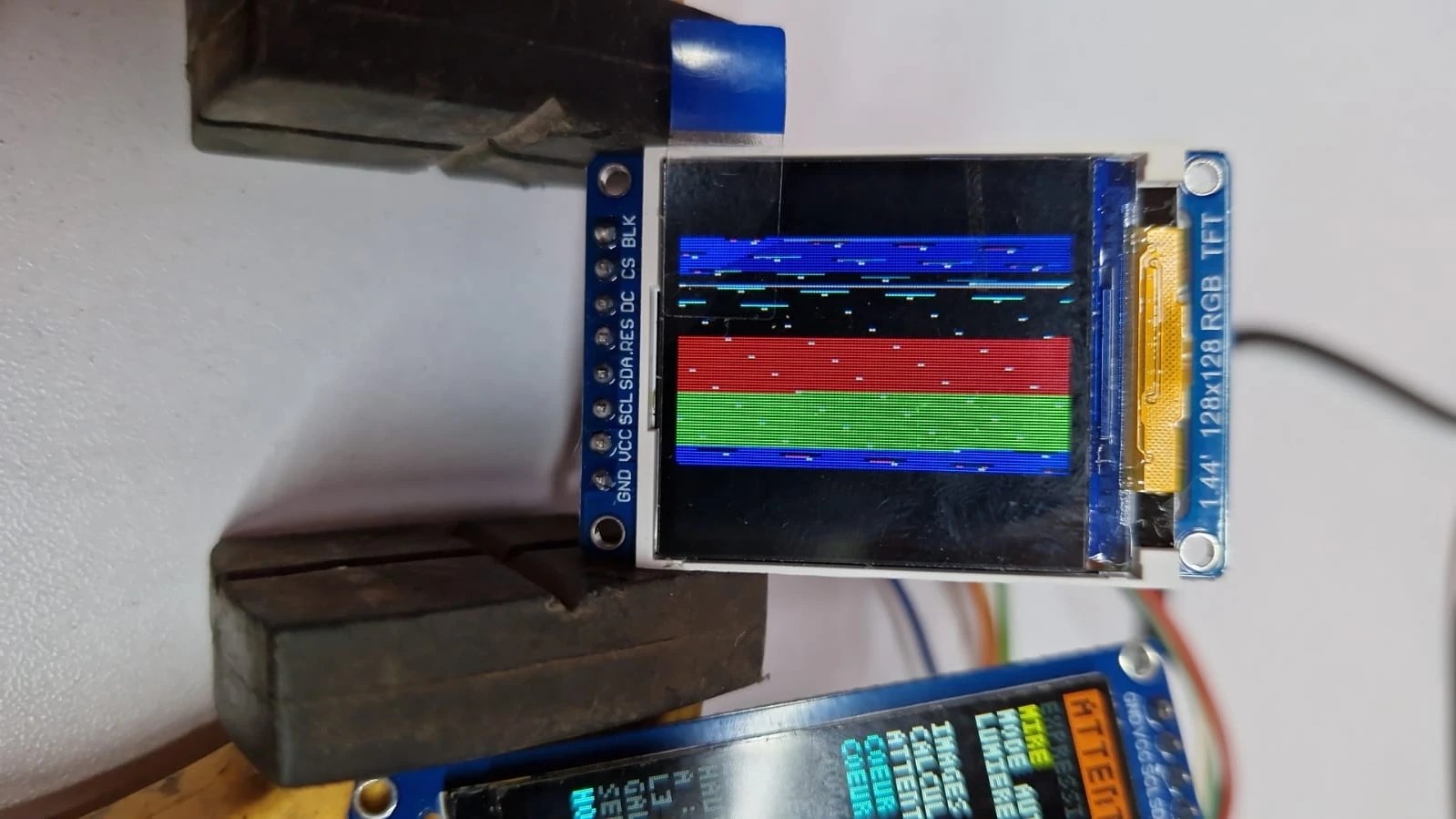
The test image comes out folded over on itself: the panel really is square, 128 × 128, and whatever is written beyond is lost. Hence the decision that changed the drawing: compute the eyes at the size of the screen, instead of shrinking or cropping the mock-up’s eye. What is placed on the screen (the eyelids, the position of the iris, the highlights) follows the screen, in width and height separately. What has a shape (the iris, the pupil, the drops, the wiper, the thickness of the traces) follows a single scale, the geometric mean of the two. On the square screen, the eye therefore opens higher, and the iris grows without being squashed. The same program adapts to any other screen size.
Too slow: 8 frames per second
Once the eye was on screen, the information screen gave the first figures.
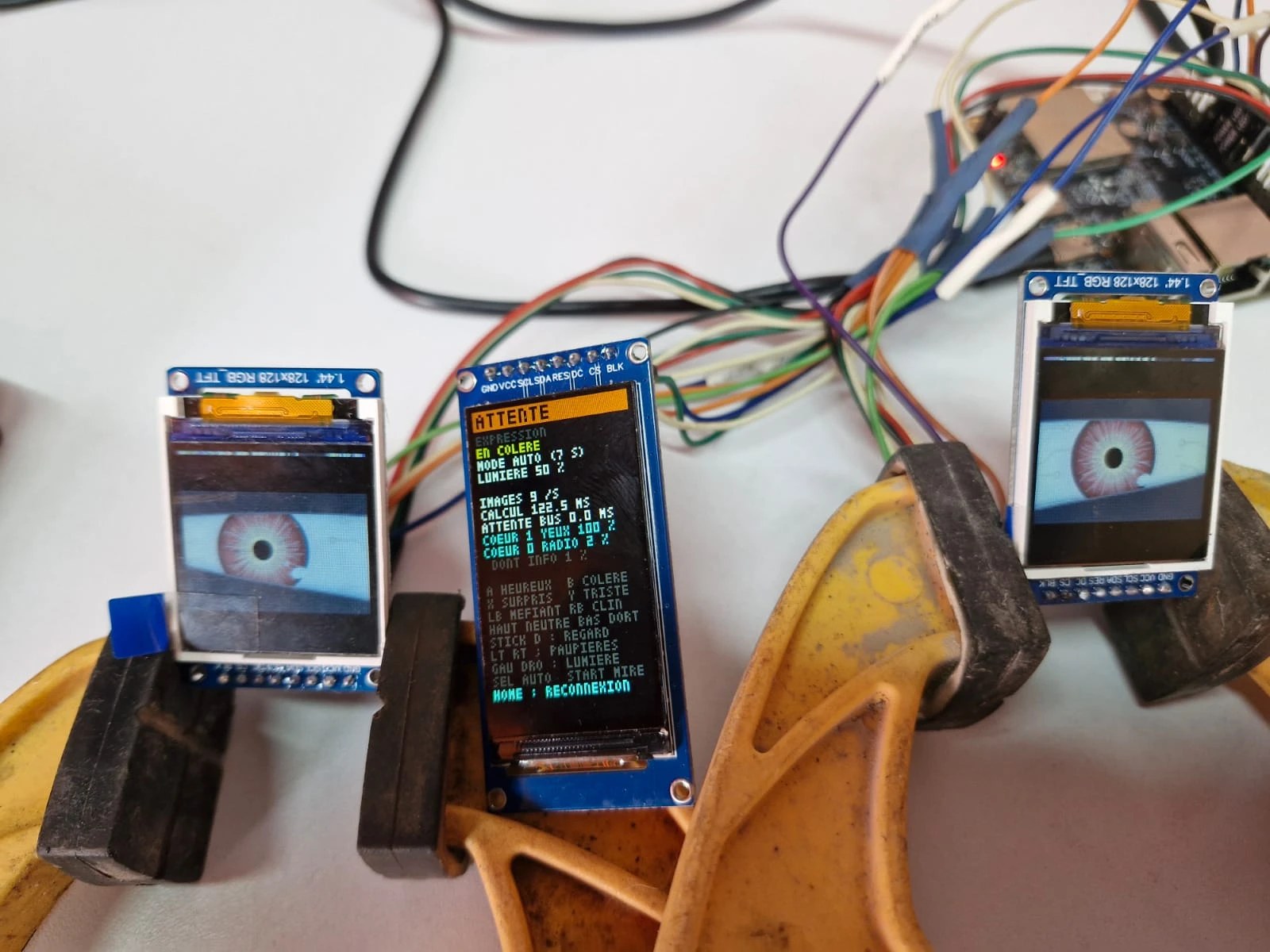
| Measurement | First reading | Final version |
|---|---|---|
| Frames per second | 8 to 14 | 31 |
| Computing both eyes, per frame | 66 to 136 ms | 17 to 28 ms |
| Pixels computed per frame | 2 × 12,800 | 2 × 16,384 |
| Eye core | 98 to 100% | 56 to 89% |
| Radio and information screen core | 1 to 2% | 3% |
The first reading said three things. Computing was two to four times too slow: thirty frames per second allows 33 ms at most. The bus had nothing to do with it: it never waited. Bluetooth costs almost nothing: 2% of a core, which separating the cores was meant to reveal. The tricks that took us from the first column to the second all come down to one idea: compute only once what does not change, and compute only once what both eyes have in common.
- The iris is precomputed. Its texture (120 fibres, 14 small spots, a collarette, two rings) does not move with it: it is computed at start-up into a small image per eye, laid in place of the iris on every frame. All that stays live is the pupil, which breathes, and the colour, which turns red with anger.
- All the layers of a drawing boil down to two numbers. Painting one colour over another with transparency is a linear operation: chained together, the layers of the iris boil down to “below × m + a”. m and a are found by compositing once over black and once over white, and the iris is then laid down with one multiplication and one addition per pixel. The same method serves for the raindrops and the wiper.
// Compositing over black gives a; over white, 255·m + a.
const Couleur noir = composer(dx, dy, NOIR, 0), blanc = composer(dx, dy, BLANC, 0);
p.m = octet(blanc.r - noir.r);   // the share of what lies below that remains
p.a_calme[0] = octet(noir.r);    // what the iris adds (and likewise for green and blue)
// On every frame, for every pixel of the iris:
c = {c.r * m + p.a_calme[0] + (p.a_colere[0] - p.a_calme[0]) * colere, /* … */};- Both eyes are drawn in a single pass. They look in the same direction: the position of the iris, the pupil, the anger glow and the highlights are the same, and are computed only once for both. The wiper too: it is recomputed only when it moves, and only near its arm.
- We paint only what touches the pixel. Away from the edge of the eyelids, the shadow, the rim and the eyelid change nothing: a test skips them. The shadow blur is read from a table instead of costing two exponentials per pixel.
- The PSRAM holds the precomputed drawings (backgrounds, irises, layers, about 250 KB), and leaves the internal memory to Bluetooth and to the transfers to the screens.
The trap of the busy wait
After all that slimming down, the eye core still stood at 100%. Computing both eyes was finished, but sending the right eye had to wait for the bus to finish sending the left one, some fifteen milliseconds. Two surprises added up.
The first: that wait blocked the eye task, which could not start the next frame. Sending therefore moved to a separate task, which waits for the bus while the eyes compute; the driver first copies each frame into its own buffer, so that the program can redraw its own straight away.
The second: ESP-IDF’s SPI driver sends commands by “polling”, that is, it waits for the bus to finish by spinning, checking over and over whether it is free. Meanwhile the core looks full while doing nothing useful. The sending task now waits for the end of the left eye on a signal, asleep, and only then starts the right eye. The measurement itself was misleading: it counted that wait as computing, and showed “33.6 ms of computing” with a core half free. Computing and sending are now measured separately.
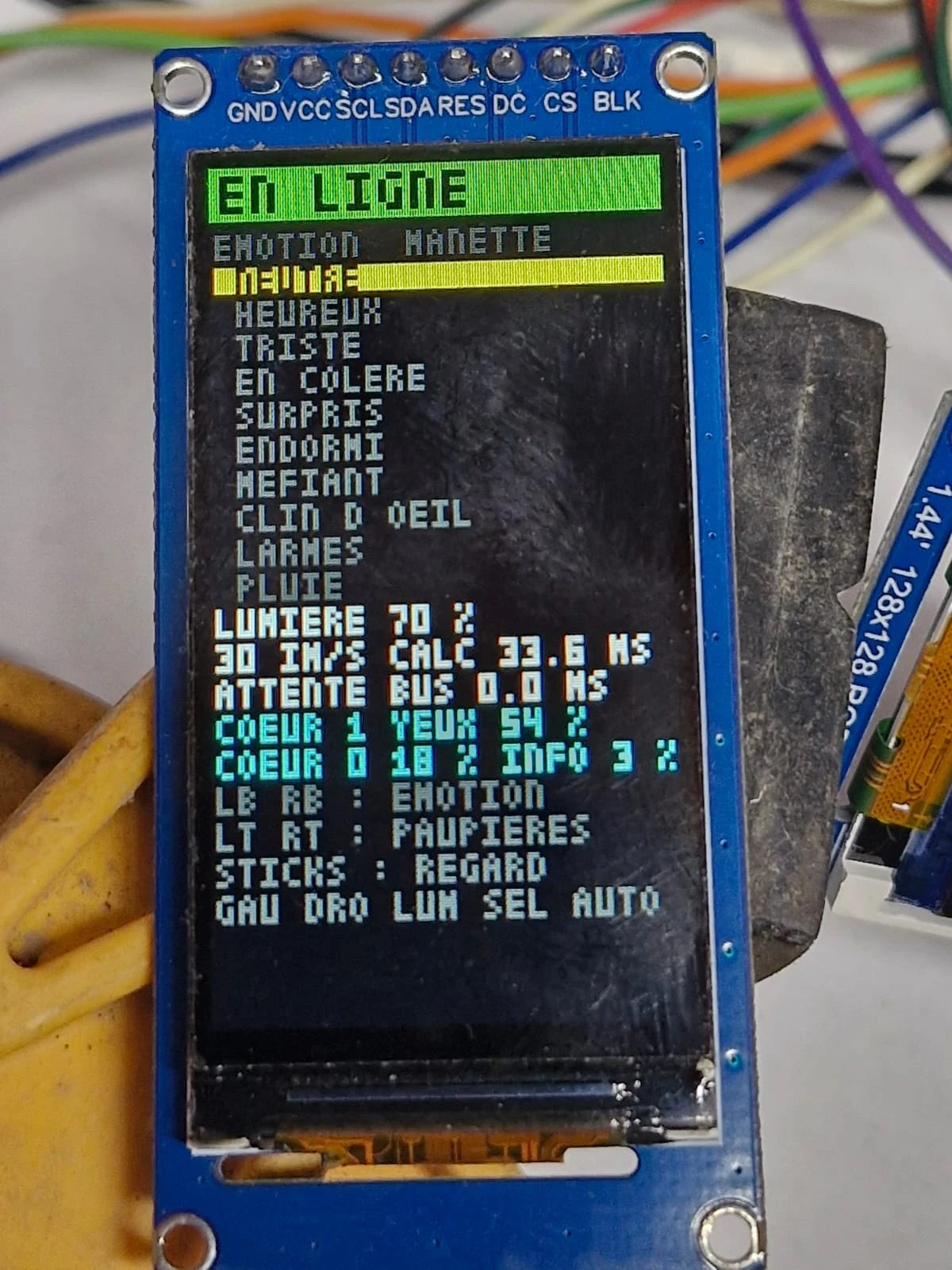
This screen also shows the list of expressions, which could not be read from two paces away. In the final version, it gave way to a single line: the chosen expression in large black letters on a yellow background.
Steps on the eyelids
When the eyelids moved fast, they showed staircase steps along their edge. This is screen tearing: the screen redraws itself on its own, at its own pace, while the next frame is being written to it. During a refresh, it therefore shows a piece of the old frame and a piece of the new one. The usual remedy is a signal from the screen announcing the start of each refresh, but these eight-pin modules do not bring it out.
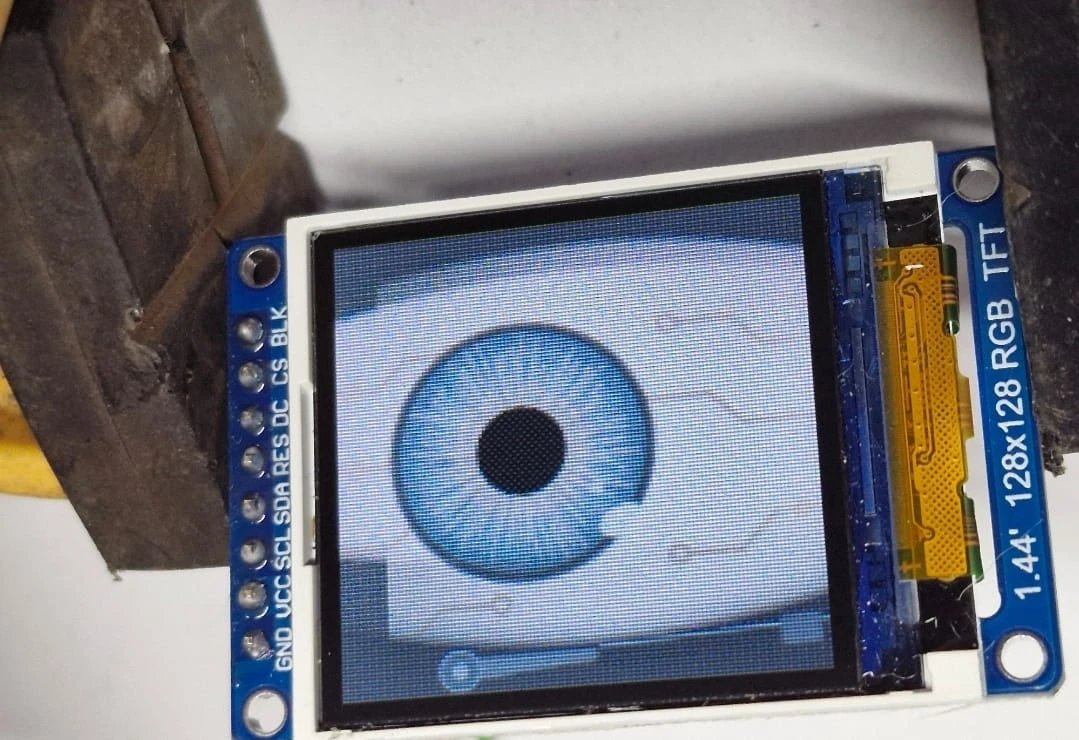
What worked is annoyingly simple: mount the panel the way it was made to sit. A panel refreshes along ITS own rows. The screens were mounted sideways, with the image turned a quarter turn by the program: their rows were then vertical for us, and the cut between old and new frame sliced across the edge of an eyelid moving up or down. Mounted the right way, the cut runs parallel to the edge of the eyelid, and the step disappears.
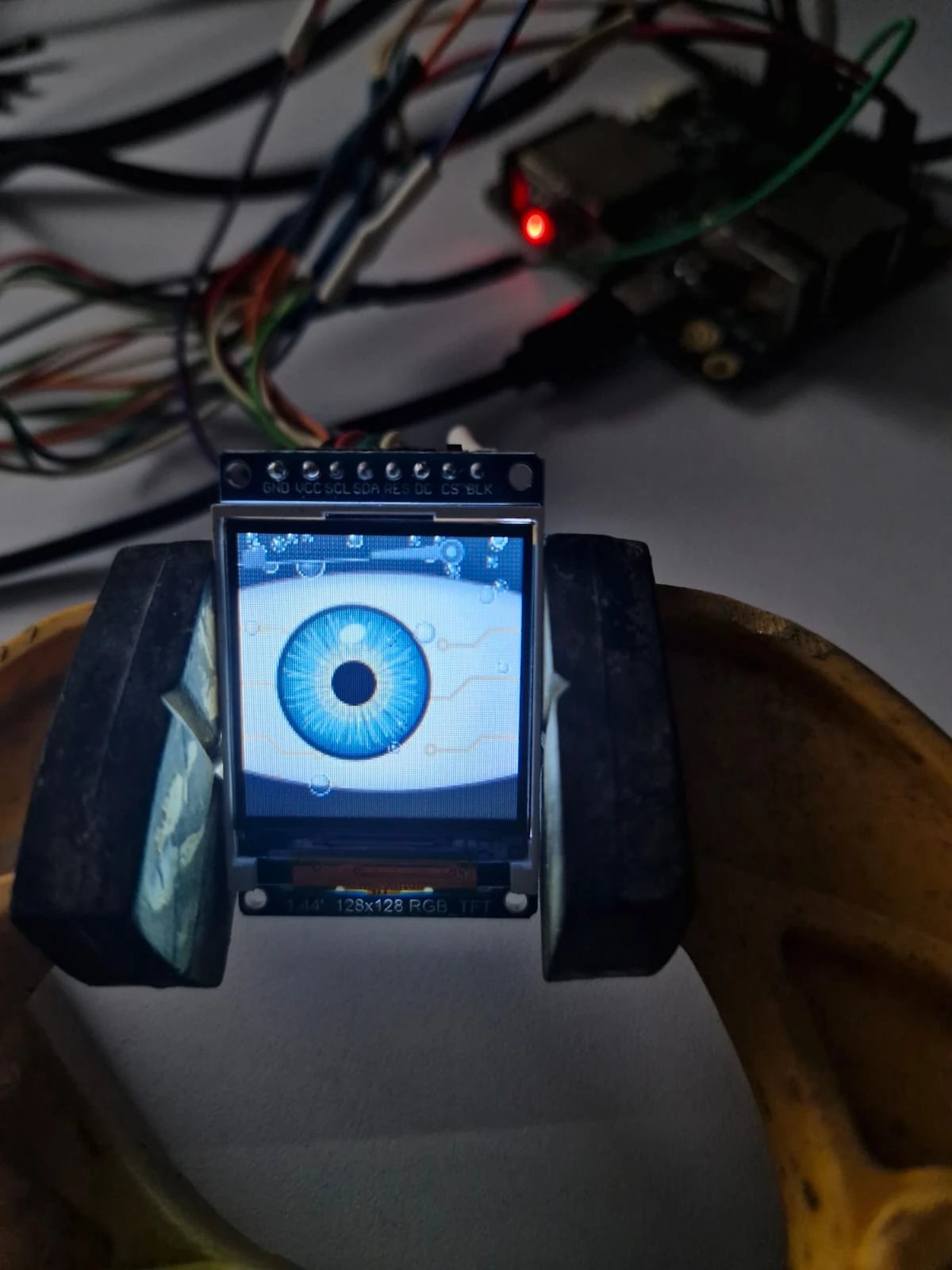
On the robot, the screens will therefore have to be mounted the same way, pins up.
The gaze that would not come back
One last fault showed up while playing with the final version: let go suddenly, the stick left the pupil near the edge of the eye instead of bringing it back to the centre. Two suspects. First the controller: does it really send the rest position when the stick snaps back? To find out without guessing, the information screen now shows the raw values of both sticks, in orange as soon as one leaves the dead zone (the small zone around the centre where the stick counts as released). Then the program. It was the culprit. When the stick enters its dead zone, the gaze stops being imposed, but its target remained the last position received. Released gently, that last reading is almost at the centre and nothing shows; released quickly, it is still near the edge. The fix was to bring the target back to the centre the moment the stick is released; automatic life resumes 0.8 seconds later. That the pupil now returns to the centre also proves that the controller was sending its rest position all along.
The final program
It compiles with ESP-IDF 6.1 (option --preview, since the ESP32-S31 is still in preview): yeux-esp32-s31.zip. The program’s names and comments are in French. The archive contains:
main/essai_yeux.cpp: the program, with its two tasks (the eyes on core 1, the information screen on core 0) and the sending task;components/yeux: the drawing and life of the eyes, at the size of whatever screen it is given;components/ecran_st7735: the eye driver, with the settings for both panels in its header (DALLE_0_96_POUCE,DALLE_1_44_POUCE);components/ecran_st7789andcomponents/liaison_manette: the information screen and the link from the previous article;sdkconfig.defaults: Bluetooth on core 0, the PSRAM, and measurement of the time spent in each task.
Wire as in the decisions table, with the 1.44-inch screens mounted pins up. At start-up, a grid appears on both eyes until A is pressed. Then:
| Control | Effect |
|---|---|
| LB, RB | previous and next expression; the information screen shows it in large letters |
| A, B, X, Y, D-pad up and down | happy, angry, surprised, sad, neutral, sleepy |
| L3, R3 (sticks pressed in) | tears, rain |
| sticks | the gaze; at the end of its travel, half the iris slips under the edge |
| LT, RT triggers | close the left eye and the right eye, in proportion to the pressure |
| D-pad left and right | brightness, from 5 to 100% |
| SEL | automatic cycle, one expression every 7 s |
| START (held) | the setting-up grid |
The final version of the eyes
To finish, here are the eyes as the board draws them: square screen, more visible traces, the iris slipping halfway under the edge at the end of its travel (“Gaze” button), big raindrops and the wiper always in place. It is the mock-up redone from the final program; you can download it like the first one.
The eyes hold their thirty frames per second, with one core busy between half and nine tenths of the time depending on the expression, and the radio almost idle alongside. One question remains for the robot: it has only two cores, and the second is promised to the motors. Will the eyes move to the first, alongside the radio, slimmed down once more, or will they get help from the chip’s graphics accelerator? That is the next job.
Sources and lineage
The style of the eyes is inspired by the animated eyes Adafruit made popular on its boards (the “Uncanny Eyes” project).
The starting settings for the 0.96-inch screens come from LCDWiki’s demonstration program for that module; those for the 1.44-inch module were found on the bench, with the setting-up grid.
The ST7735S chip: Sitronix datasheet, for the commands (MADCTL scan direction, write window, refresh rate).
The programs in the archives are released under the PolyForm Noncommercial License 1.0.0: you may use, modify and share them for personal, educational, research or charitable purposes; any commercial use requires the author’s written permission. The Espressif files they contain keep their own licence.
© Sébastien Debucquoi — All rights reserved.